
github地址:https://github.com/angristan/openvpn-install
工作原理
- 在云服务器上运行一键安装脚本、配置OpenVPN,生成“虚拟交换机”
- 用OpenVPN客户端链接到Server服务端,它们就拿到同一网段的虚拟IP,组成一个异地局域网
- 数据加密 > 上传云服务器中转解密 > 转发到Client对端,全程AES-256-GCM,TLS 1.3等
前提条件
- | 云服务器 | 2C2G | Debian/Ubuntu 20.04+
- | 本地设备 | NAS/mac/windows/软路由等
开始部署
1. 下载安装脚本
curl -O https://raw.githubusercontent.com/angristan/openvpn-install/master/openvpn-install.sh
chmod +x openvpn-install.sh
2. 安装openvpn
./openvpn-install.sh install


- 等待安装完成即可
3. 使用Interactive Mode
./openvpn-install.sh interactive

4. 新增用户

选则2设置客户端密码,提高安全性 Do you want to protect the configuration file with a password? (e.g. encrypt the private key with a password)
- Add a passwordless client
- Use a password for the client
Select an option [1-2]: 2

客户端的证书放在/root/目录下面
cd /root/

5. 使用客户端starbucket.ovpn证书连接服务端
- 下载openvpn GUI 客户端
官网下载地址:
https://www.softpedia.com/get/Internet/Secure-Browsing-VPN/OpenVPN-Connect.shtml
把客户端证书导入到安装好的openvpn客户端里面进行连接
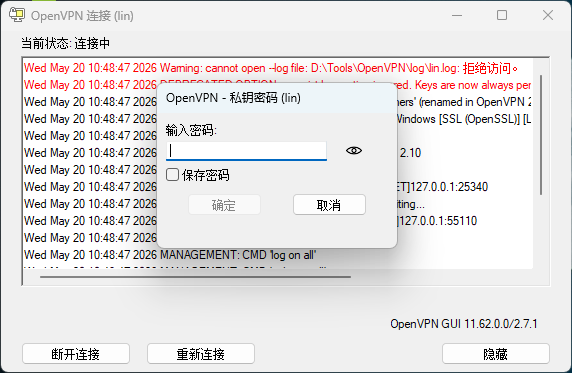
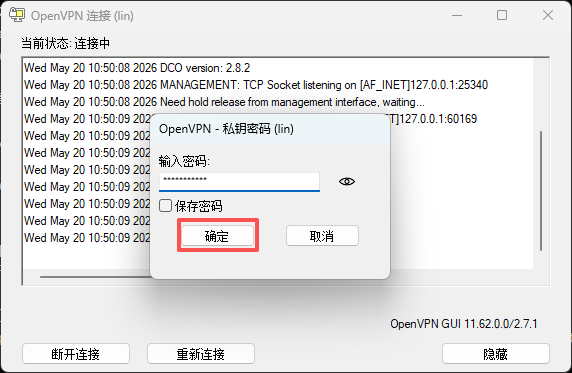
输入客户端密码,点击确认
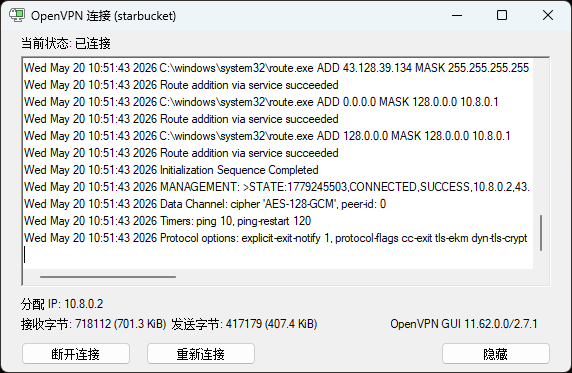
显示已连接,就大功告成!
6. 测试连通性,获取服务端虚拟IP, 在客户端 ping

Comments & discussion
The first comment in each thread opens a topic. Signed-in readers can keep the conversation going under that topic.
No comments yet. Sign in to start a topic.
Start a new topic
Sign in to start a topic or join the discussion.