容器服务
Ubuntu 使用Minikube快速构建单点集群
什么是Minikube
- Minikube是一个开源工具,用于在本地开发环境中快速搭建一个单节点的Kubernetes集群。
- 它支持多种虚拟化技术,在不同平台上都可以运行,如VirtualBox、Hyper-V、KVM等。
- 通过Minikube,开发人员可以方便地在本地环境中测试、构建和部署应用程序,并尝试不同的Kubernetes功能和配置。
- Minikube提供了一些命令行工具,如kubectl,用于与Kubernetes集群进行交互,可以在本地开发中提高效率和便捷性。
1)下载minikube安装包
curl -LO https://github.com/kubernetes/minikube/releases/latest/download/minikube-linux-amd642)安装minikube
sudo install minikube-linux-amd64 /usr/local/bin/minikube && rm minikube-linux-amd64- 检查是否安装成功
minikube version
3)部署集群
minikube start- 可能会遇到问题:Exiting due to NOT_FOUND_CRI_DOCKERD:
root@k8s-master:/opt/tools# minikube start
😄  minikube v1.36.0 on Ubuntu 24.04 (amd64)
✨  Using the none driver based on existing profile
👍  Starting "minikube" primary control-plane node in "minikube" cluster
🔄  Restarting existing none bare metal machine for "minikube" ...

🐳  Exiting due to NOT_FOUND_CRI_DOCKERD:

💡  Suggestion:

    The none driver with Kubernetes v1.24+ and the docker container-runtime requires cri-dockerd.

    Please install cri-dockerd using these instructions:

https://github.com/Mirantis/cri-dockerd- 解决方法,安装cri-dockerd
# 下载 cri-dockerd安装包

wget https://github.com/Mirantis/cri-dockerd/releases/download/v0.3.20/cri-dockerd_0.3.20.3-0.ubuntu-jammy_amd64.deb

# 安装 cri-dockerd
sudo dpkg -i cri-dockerd_0.3.20.3-0.ubuntu-jammy_amd64.deb- 重新运行 minikube start,大功告成!
root@k8s-master:/opt/tools# minikube start
😄  minikube v1.36.0 on Ubuntu 24.04 (amd64)
✨  Using the none driver based on existing profile
👍  Starting "minikube" primary control-plane node in "minikube" cluster
🔄  Restarting existing none bare metal machine for "minikube" ...
ℹ️  OS release is Ubuntu 24.04 LTS
🐳  Preparing Kubernetes v1.33.1 on Docker 27.5.1 ...
    ▪ kubelet.resolv-conf=/run/systemd/resolve/resolv.conf
    > kubeadm.sha256:  64 B / 64 B [-------------------------] 100.00% ? p/s 0s
    > kubelet.sha256:  64 B / 64 B [-------------------------] 100.00% ? p/s 0s
    > kubectl.sha256:  64 B / 64 B [-------------------------] 100.00% ? p/s 0s
    > kubectl:  57.34 MiB / 57.34 MiB [------------] 100.00% 11.64 MiB p/s 5.1s
    > kubeadm:  71.08 MiB / 71.08 MiB [--------------] 100.00% 7.08 MiB p/s 10s
    > kubelet:  77.91 MiB / 77.91 MiB [--------------] 100.00% 2.78 MiB p/s 28s
    ▪ Generating certificates and keys ...
    ▪ Booting up control plane ...
    ▪ Configuring RBAC rules ...
🔗  Configuring bridge CNI (Container Networking Interface) ...
🤹  Configuring local host environment ...

❗  The 'none' driver is designed for experts who need to integrate with an existing VM
💡  Most users should use the newer 'docker' driver instead, which does not require root!
📘  For more information, see: https://minikube.sigs.k8s.io/docs/reference/drivers/none/

❗  kubectl and minikube configuration will be stored in /root
❗  To use kubectl or minikube commands as your own user, you may need to relocate them. For example, to overwrite your own settings, run:

    ▪ sudo mv /root/.kube /root/.minikube $HOME
    ▪ sudo chown -R $USER $HOME/.kube $HOME/.minikube

💡  This can also be done automatically by setting the env var CHANGE_MINIKUBE_NONE_USER=true
🔎  Verifying Kubernetes components...
    ▪ Using image gcr.io/k8s-minikube/storage-provisioner:v5
🌟  Enabled addons: default-storageclass, storage-provisioner

❗  /usr/local/bin/kubectl is version 1.31.0, which may have incompatibilities with Kubernetes 1.33.1.
    ▪ Want kubectl v1.33.1? Try 'minikube kubectl -- get pods -A'
🏄  Done! kubectl is now configured to use "minikube" cluster and "default" namespace by default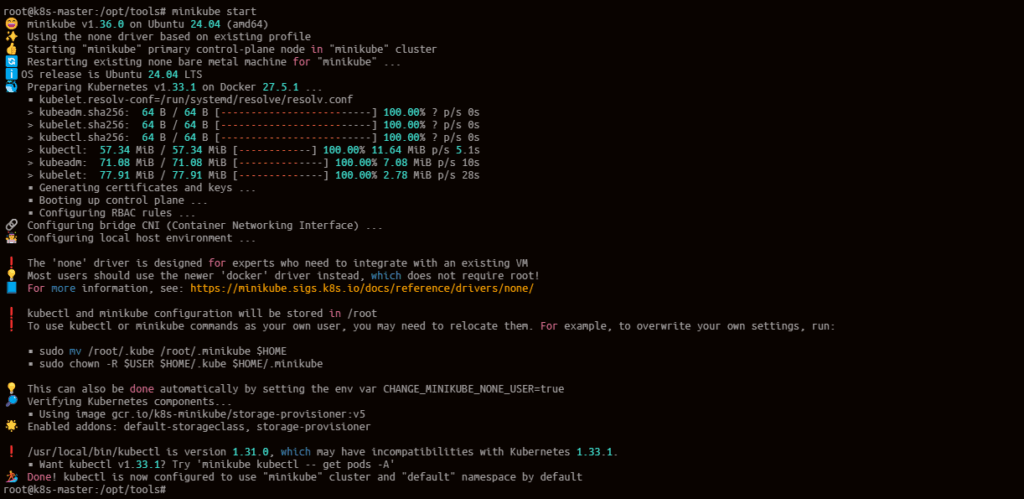

- 关闭minkube集群
minikube stop
starbucket
0
Tags :